for people who hit the 5-hour wall

Know your limits.

TokenHub pins your real Claude Code, Cowork and Codex usage to the Windows taskbar — live limit percentages, reset countdowns, and what every agent is doing right now. So the cap never surprises you mid-refactor again.

Free forever · MIT licensed · Windows 10 & 11 · no account, no telemetry

5h 36% · 3h
7d 23% · 3d

the mini-bar

Two bars. Everything you actually need.

A slim widget docked overtop the taskbar — always visible, never in the way. It answers the only three questions that matter while an agent runs: how much is left, when does it reset, and does it need me?

5h 36% · 3h
7d 23% · 3d
status light:
  • Status light — what your agent is doing right now. Green: working. Amber: waiting on you. Red: stopped. Per provider — the Claude bar only reflects Claude chats, the Codex bar only Codex.
  • 5h & 7d windows — both rolling limits your subscription actually enforces, as segmented bars with the exact percentage.
  • Reset countdown — when the window rolls over, as a countdown or a clock time. No more guessing when you're back.
  • Scroll to flip — mouse-wheel over the bar rolls a 3D prism between Claude and Codex. Try it on the one in the taskbar above.

beyond the bar

Click it, and the whole picture opens.

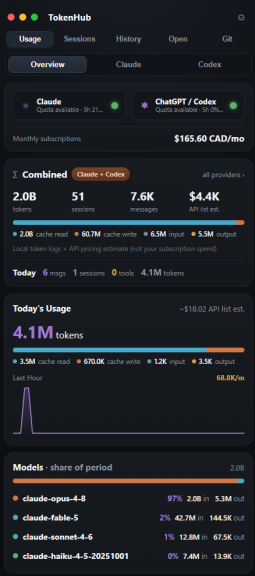
The mini-bar is the tip. A click opens the full flyout: analytics, live agents, history and your repos. Built with Tauri v2 — a Rust core and a web UI — so it stays tiny and fast.

  • Usage, Sessions, History, Open and Git — one panel
  • Overview or per-provider views for Claude and Codex
  • Combined monthly subscription total across both
The real TokenHub flyout panel: Usage, Sessions, History, Open and Git tabs; Claude and ChatGPT/Codex quota chips; combined token, session and message totals with cache breakdown; today's usage with a last-hour rate chart; per-model share of the period.
The actual flyout — not a mockup.

Live agent monitoring

Every active chat is a card — the repo it's in and a one-sentence summary of what it's doing. Open the dropdown to see the agents inside: the main agent and its sub-agents, each with a goal, a status, and an expandable detail of what it's working on. Idle chats drop off after 10 minutes.

Deep usage analytics

Overview, Claude and Codex views: total tokens, sessions, messages, API-list cost estimates, cache-read / cache-write / input / output breakdown, per-model share, and a combined monthly subscription total.

Full history

Every past chat, grouped by project, with totals per repo. Rename it, delete it — or resume it in its terminal with one click and pick up exactly where the conversation left off.

Git dashboard

Your local repos at a glance — branch, dirty files, ahead/behind, last commit — next to every repo on your GitHub accounts. One place to see what state everything is in before you point an agent at it.

Alerts before the wall

Notifications at 75, 90 and 95% of either window — enough warning to wrap the task, commit, and plan around the reset instead of being cut off by it.

Quality of life

The small stuff, done properly.

  • global hotkey Ctrl+Shift+U
  • tray icon styles
  • used ↔ remaining toggle
  • display profiles
  • autostart
  • opt-in water-guilt meter

The water meter estimates your session's datacenter cooling water. It changes nothing. It just knows.

how the numbers stay accurate

Real numbers, not vibes.

Most trackers guess your limits by counting tokens locally and hoping the math matches the provider's. TokenHub doesn't guess.

  1. 1
    Your sign-in, your machine

    Opt in, and TokenHub reads the local OAuth sign-in your CLI already uses. It never leaves your machine and is never sent anywhere except to the provider you signed in with.

  2. 2
    Asked at the source

    It queries the provider's own usage API — the same source Claude Code's built-in counter reads. The 5h and 7d percentages are the provider's numbers, not a reconstruction.

  3. 3
    Honest when offline

    If the API is unreachable, TokenHub falls back to a local estimate from your own logs — and labels it EST so you can never mistake a guess for the real thing.

privacy

Nothing leaves your machine.

Not a promise in a policy — an architecture. There is no server to send anything to.

Reads your logs, locally

TokenHub watches the files your tools already write on disk:

  • ~/.claude/projects
  • Cowork session dirs
  • ~/.codex/sessions

No server. No telemetry. No account.

Nothing is uploaded, tracked or phoned home. The only network calls are the ones you opt into: asking your provider for your own usage numbers.

Keys stay in Credential Manager

Any API key you enter is stored in Windows Credential Manager, encrypted by the OS — not in a config file, not in the cloud.

Open source. Verify it.

MIT licensed, every line on GitHub. Don't take this page's word for any of it — read the code.

faq

Fair questions.

Is it free?

Yes — free and MIT-licensed open source. No pro tier, no trial, no "free for now". If it ever saves you from one blown deadline it has paid for itself, which is convenient, because you can't pay for it.

Windows only?

For now, yes — Windows 10 and 11, using WebView2. The mini-bar is built around the Windows taskbar, which doesn't exist anywhere else. No macOS or Linux build yet, and we won't pretend one is imminent.

Does my data leave my machine?

No. TokenHub reads your machine's own log files and has no server, telemetry or account. The only outbound requests are the opt-in usage queries to your own provider, using your own sign-in. It's open source, so this is verifiable rather than a vibe.

Does it work with both Claude and Codex?

Yes — Claude Code, Claude Cowork and OpenAI Codex/ChatGPT, side by side. Each provider gets its own bar, its own status light and its own analytics view; scroll on the mini-bar to flip between them.

How do the percentages match the real counter?

Because they come from the same place. With your opt-in, TokenHub reads the provider's usage API using the local OAuth sign-in your CLI already has — the same source Claude Code's built-in counter uses. When the API is unreachable it shows a local estimate instead, clearly labelled EST.

Put your limits where you can see them.